April 1st comes and goes. The prank press releases, fake product launches, and “gotcha” announcements disappear.
Unfortunately, scammers don’t take the day off.
Spring is one of the busiest seasons for cybercriminals, not because teams suddenly get reckless, but because everyone is juggling more. People are distracted, moving fast, and trying to clear their inbox between meetings. That’s when the “almost believable” scams sneak in. The ones that look normal… until they aren’t.
Below are three real scams hitting businesses right now in Vancouver and across Canada. Not scams targeting “gullible” people, scams catching smart, experienced employees who simply didn’t have time to stop and think:
As you read these, ask yourself one question: Would every person on your team pause long enough to catch each one?
Scam #1: The Toll Road (or Parking Fee) Text
A team member gets a text:
“You have an unpaid toll balance of $6.99. Pay within 12 hours to avoid late fees.”
It references a legitimate system (E‑ZPass, FasTrak, SunPass) or whatever matches their province. The dollar amount is small. They just drove on Highway 99 or parked downtown last week. It feels routine.
They tap. They pay. They move on.
Except the link wasn’t real.
- In 2024, the FBI recorded over 60,000 complaints about fraudulent toll texts.
- In 2025, volume jumped 900%.
- Over 60,000 fake domains were created solely to impersonate toll authorities.
Some people received these texts despite living in states or provinces with zero toll roads.
Why it works:
A $6 fee doesn’t feel like a scam. People are rushed. The message blends into a normal day.
Guardrail that works:
Legitimate toll agencies never demand payment by text.
Smart businesses follow one rule:
No payments through text-message links. Ever.
If something seems legit, employees go directly to the official website or app, never by clicking the link.
And they don’t reply “STOP,” because that confirms their number is active.
Convenience is the bait.
Process is the defense.
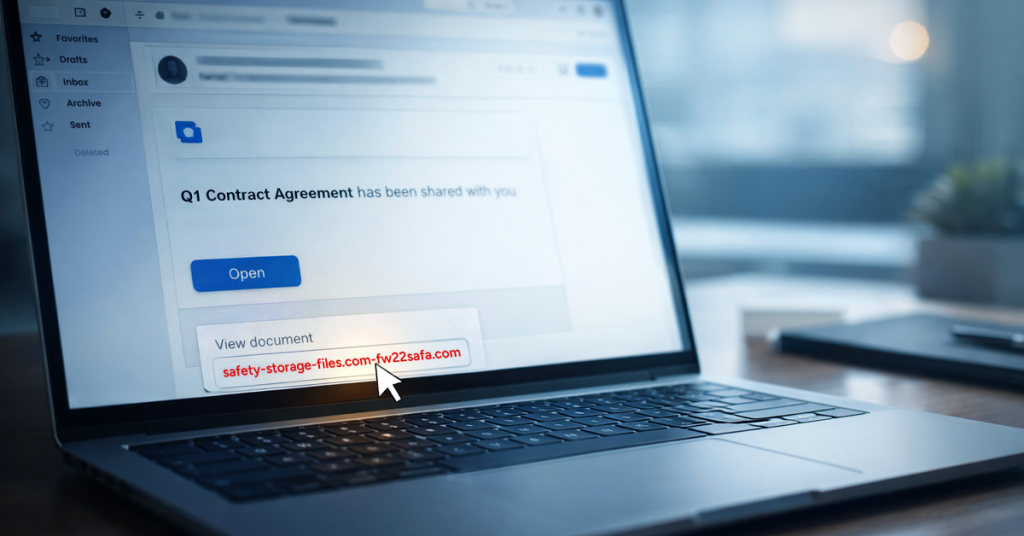
Scam #2: The “Your File Is Ready” Email
This one blends in perfectly at work.
An employee receives an email:
- “A document has been shared with you in OneDrive.”
- “Your DocuSign file is ready.”
- “A colleague shared a Google Drive folder.”
The sender name looks right.
The formatting looks right.
It’s identical to every real notification they receive.
They click.
They log in.
And now an attacker has their credentials and possibly access to your entire cloud environment.
Phishing campaigns abusing trusted platforms like Microsoft 365, Google Drive, DocuSign, and Salesforce increased 67% in 2025.
Google Slides–based phishing links surged 200% in just six months.
Even worse:
Employees are 7x more likely to click a malicious OneDrive/SharePoint link than a random email because notifications look so normal.
Newer versions are even tougher. Attackers compromise an account, create a real file inside it, and share it through the platform itself. The email comes directly from Microsoft’s or Google’s legitimate servers, nothing for spam filters to catch.
Guardrail that works:
If the file wasn’t expected:
Employees go to the platform directly, OneDrive, SharePoint, Google Drive—rather than clicking the email.
If the file is legitimate, it will be there.
Businesses can also reduce exposure by:
- Tightening external sharing permissions
- Enabling alerts for unusual login activity
Both take about 15 minutes for IT to configure.
Boring habit.
Massive payoff.
Scam #3: The Email That’s Written Too Well
Gone are the days of broken English, weird spacing, and “Dear Sir/Madam” madness.
Today’s phishing emails are clean, calm, polished and scarily accurate.
A 2025 academic study found:
- AI-generated phishing emails had a 54% click rate.
- Human-written ones? 12%.
Attackers can now:
- Reference real companies
- Mention real job titles
- Mimic internal workflows
- Pull data from LinkedIn in seconds
And it gets worse.
Departmental targeting is now the norm:
- HR receives fake employment verification requests
- Finance receives fraudulent vendor change notices
- Leadership receives fake “urgent” account access requests
In one test, 72% of employees engaged with a vendor impersonation email, 90% higher than other phishing types.
Because the emails… look completely normal.
Guardrail that works:
Any request involving credentials, money, or sensitive data requires a second verification channel:
- A call
- A chat
- A quick walk down the hall
And employees hover over every sender address, checking the actual domain—because attackers count on people being in a hurry.
If an email creates urgency?
Treat the urgency itself as the red flag.
What This Really Comes Down To
Each of these scams relies on:
- Familiarity
- Authority
- Timing
- And the belief that “this will only take a second”
The biggest risk isn’t a “careless employee.”
It’s a system that expects people to perform flawlessly under pressure.
If one rushed click could derail your day…
That’s not a people problem.
That’s a process problem.
And process problems can be fixed.
Where Comwell Can Help
Most Vancouver business owners don’t want to become cybersecurity experts. They just want confidence that their team isn’t quietly exposed.
If you’re concerned about what your staff might be seeing or you know another local business owner who should be, you can book a quick discovery call.
No scare tactics.
No tech jargon.
Just a straightforward conversation about:
- The threats Vancouver businesses are seeing right now
- Where gaps typically appear in everyday workflows
- Practical ways to reduce risks without slowing people down
Call us at 604-303-8600 or book a discovery call online.
If this wasn’t for you, feel free to forward it to someone who’d appreciate the heads‑up. Sometimes awareness alone turns a “would have clicked” into a “nice try.”